> ## Documentation Index
> Fetch the complete documentation index at: https://trunk-4cab4936-sam-gutentag-api-conventions.mintlify.site/llms.txt
> Use this file to discover all available pages before exploring further.
# Go
> A guide for generating Trunk-compatible test reports for Go tests
You can automatically [detect and manage flaky tests](../../detection/) in your Go projects by integrating with Trunk. This document explains how to configure Go to output JUnit XML reports that can be uploaded to Trunk for analysis.
## Why an Extra Step for `go test`?
The standard Go test runner, `go test`, is excellent for executing tests and providing immediate feedback to developers. However, it does not natively produce test reports in the JUnit XML format that Trunk Flaky Tests requires for ingestion and analysis. Therefore, an additional tool is needed to convert the output of `go test` into this compatible format. This intermediate step allows Trunk to accurately process your test results and identify flaky tests.
## Setup steps
Work through the steps below in order. Once you've finished the last one, you'll be ready to move on to [configure uploads in CI](../ci-providers/).
Generate a compatible test report (JUnit XML)} />
Configure the report file path or glob} />
Disable retries for better detection accuracy} />
Test uploads locally} />
## Generating JUnit XML Reports from Go Tests
Before integrating with Trunk, you need to generate a Trunk-compatible report. For Go, `go test` does not output JUnit XML by default, so you must use a tool to format it.
Update your existing `go test` usage to generate json and use [**go-junit-report**](https://github.com/jstemmer/go-junit-report) to convert your standard Go testing output into JUnit XML.
```
go install github.com/jstemmer/go-junit-report/v2@latest
```
Then pipe `go test` into the `go-junit-report`:
```
go test -json 2>&1 | go-junit-report -parser gojson -out junit_report.xml
```
Install gotestsum into your project:\
\
`go install gotest.tools/gotestsum@latest`\
\
Call `gotestsum` to both execute your tests and generate the junit.xml file
```
gotestsum [path-to-tests-to-run] --junitfile ./junit.xml
```
Since `go test` doesn't directly output JUnit XML, you'll use a tool to convert its output. Here are two common options:
### Option 1: Using `gotestsum`
* **What it is:** `gotestsum` is a Go test runner that wraps `go test`. It executes your tests (using `go test -json` for more structured input) and can format the results into JUnit XML, alongside other human-readable formats and test run summaries.
* **Why choose this approach:** You might prefer `gotestsum` if you favor using a single command that serves as a wrapper to both execute your Go tests (by calling `go test` internally) and directly generate the JUnit XML report required for flaky test analysis.
* **Installation:** Download from [releases](https://github.com/gotestyourself/gotestsum/releases) or install via `go install`:
```bash theme={null}
go install gotest.tools/gotestsum@latest
```
* **Usage:**
```bash theme={null}
gotestsum --junitfile ./junit-gotestsum.xml -- ./...
# The '-- ./...' passes arguments directly to 'go test'.
# Adjust './...' to target your specific packages if needed.
```
### Option 2: Using `go-junit-report`
* **What it is:** `go-junit-report` is a tool that converts the output of a standard `go test` command into JUnit XML. This is achieved by running `go test` and then piping its output to `go-junit-report` as a separate step.
* **Why choose this approach:** You might prefer `go-junit-report` if you want to keep your `go test` command distinct and add a separate, explicit step for converting its output to JUnit XML, often suitable for a minimal setup focused purely on this conversion.
* **Installation:**
```bash theme={null}
go install github.com/jstemmer/go-junit-report/v2@latest
```
* **Usage:** For reliable report generation, use `go test -json` and pipe its output. The `-parser gojson` flag tells `go-junit-report` to expect this JSON stream:
```bash theme={null}
go test -json ./... 2>&1 | go-junit-report -parser gojson -out report-go-junit.xml
# Adjust './...' to target your specific packages.
# 2>&1 ensures stderr (where build errors can appear) is also piped.
```
### Report File Path
The tools will write a JUnit test report to the file specified (e.g., `junit-gotestsum.xml` or `report-go-junit.xml`). You'll need this path when configuring uploads to Trunk.
### Disable Retries
Regardless of the tool chosen, you need to disable automatic retries if you previously enabled them. Retries compromise the accurate detection of flaky tests.\
\
If you're using a package like [**retry**](https://pkg.go.dev/github.com/hashicorp/consul/sdk/testutil/retry), disable it to get more accurate results from Trunk.
## Try It Locally
```bash Linux (x64) theme={null}
SKU="trunk-analytics-cli-x86_64-unknown-linux.tar.gz"
curl -fL --retry 3 \
"https://github.com/trunk-io/analytics-cli/releases/latest/download/${SKU}" \
| tar -xz
chmod +x trunk-analytics-cli
./trunk-analytics-cli validate --junit-paths "./junit.xml"
```
```bash Linux (arm64) theme={null}
SKU="trunk-analytics-cli-aarch64-unknown-linux.tar.gz"
curl -fL --retry 3 \
"https://github.com/trunk-io/analytics-cli/releases/latest/download/${SKU}" \
| tar -xz
chmod +x trunk-analytics-cli
./trunk-analytics-cli validate --junit-paths "./junit.xml"
```
```bash macOS (arm64) theme={null}
SKU="trunk-analytics-cli-aarch64-apple-darwin.tar.gz"
curl -fL --retry 3 \
"https://github.com/trunk-io/analytics-cli/releases/latest/download/${SKU}" \
| tar -xz
chmod +x trunk-analytics-cli
./trunk-analytics-cli validate --junit-paths "./junit.xml"
```
```bash macOS (x64) theme={null}
SKU="trunk-analytics-cli-x86_64-apple-darwin.tar.gz"
curl -fL --retry 3 \
"https://github.com/trunk-io/analytics-cli/releases/latest/download/${SKU}" \
| tar -xz
chmod +x trunk-analytics-cli
./trunk-analytics-cli validate --junit-paths "./junit.xml"
```
## Test Upload
Before modifying your CI jobs to automatically upload test results to Trunk, try uploading a single test run manually.
You make an upload to Trunk using the following command:
```sh theme={null}
./trunk-analytics-cli upload --junit-paths "./junit.xml" \
--org-url-slug \
--token
```
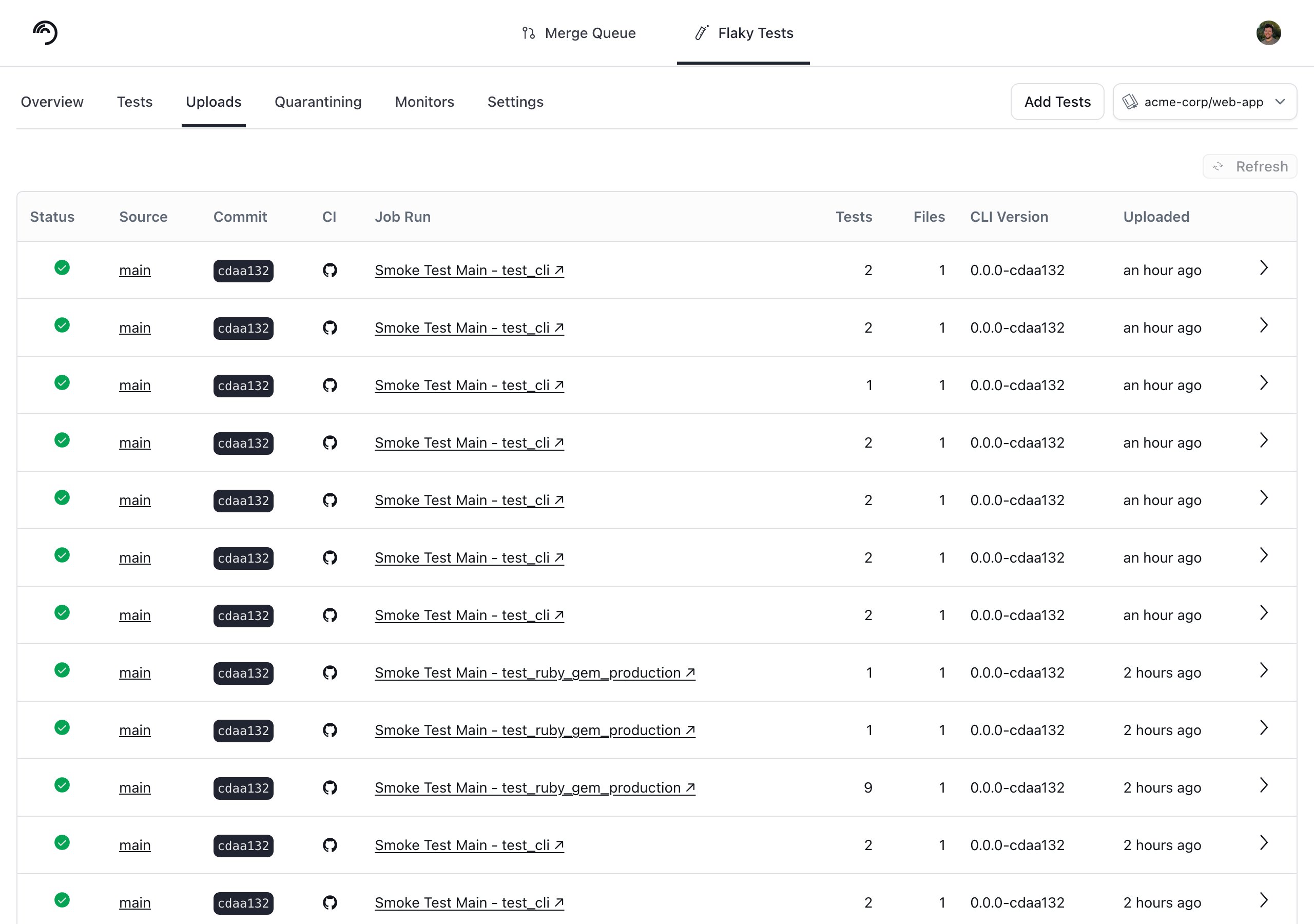
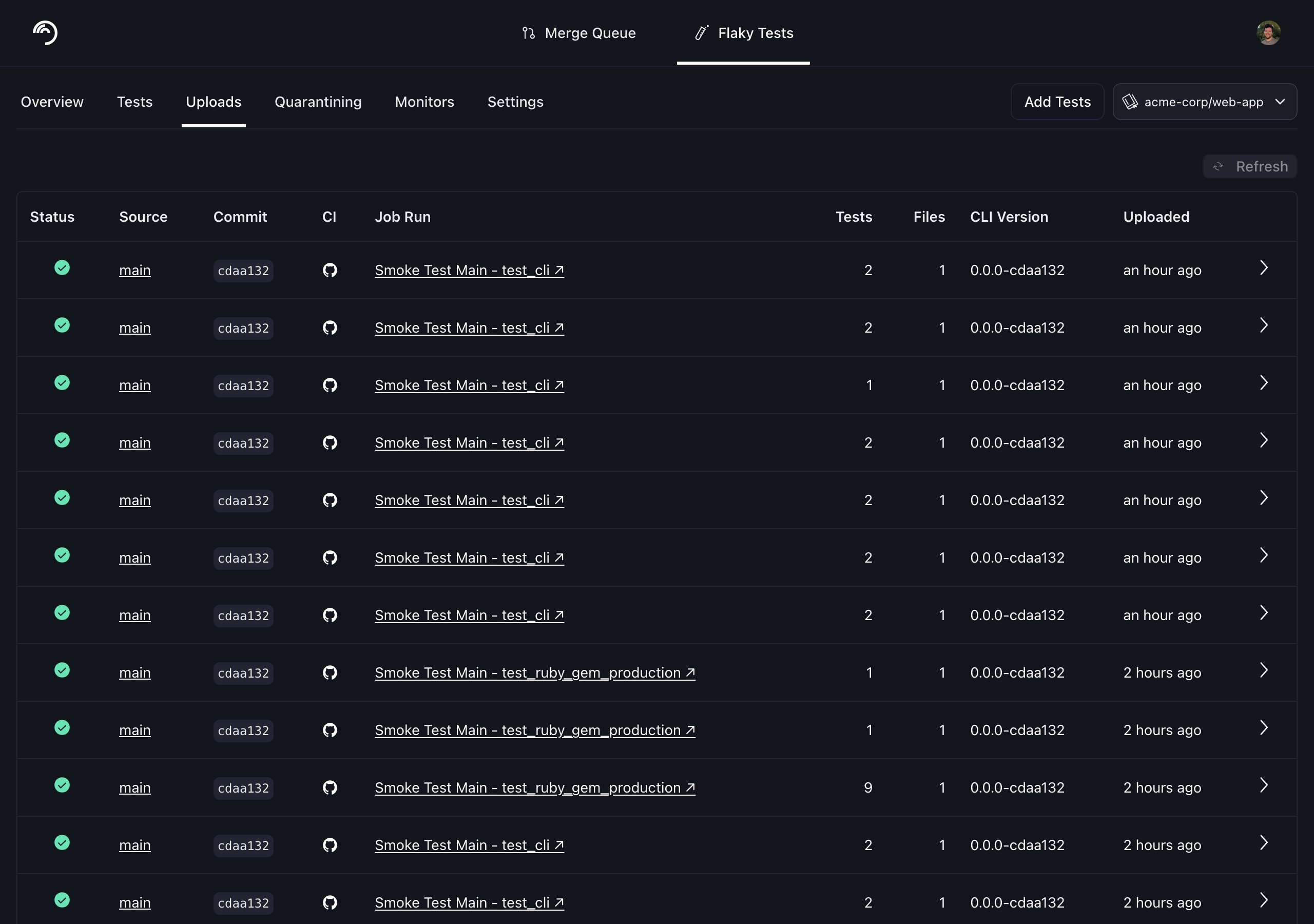
You can find your Trunk organization slug and token in the settings or by following these [instructions](/flaky-tests/get-started/ci-providers/otherci#id-1.-store-a-trunk_token-secret-in-your-ci-system). After your upload, you can verify that Trunk has received and processed it successfully in the **Uploads** tab. Warnings will be displayed if the report has issues.
 ## Next Steps
Configure your CI to upload test runs to Trunk. Find the guides for your CI framework below:
## Next Steps
Configure your CI to upload test runs to Trunk. Find the guides for your CI framework below: